How To: Hide the Navigation & Status Bars on Your Galaxy S8 for Even More Screen Real Estate No Root Needed

How To: Hide the Navigation & Status Bars on Your Galaxy S8 for Even More Screen Real Estate No Root Needed
The Samsung Galaxy S8's almost bezel-less display is truly a sight to behold, especially when set to Immersive Mode. While transparent when on the home screen, the navigation and status bars on the S8 will often turn opaque depending on what app you're using at the moment. This, in turn, can detract from the overall experience when viewing anything from the S8's display, as the bars along the top and bottom of the screen bump the phone's aspect ratio down to lower levels.As it turns out, it's actually possible to permanently set your Galaxy S8 into Immersive Mode using a method that has worked on other phones in the past. While no root is required to perform this modification, you will have to run an ADB command. So here's a guide on how to get the most out of your S8's gorgeous display — just be sure to take your time and follow the steps exactly as they appear, especially if this is your first time with ADB and Fastboot.Don't Miss: Know Your Android Tools: What is ADB & How Do You Use It?
RequirementsDeveloper options and USB debugging enabled Windows, Mac, or Linux computer ADB and Fastboot installed USB data cable

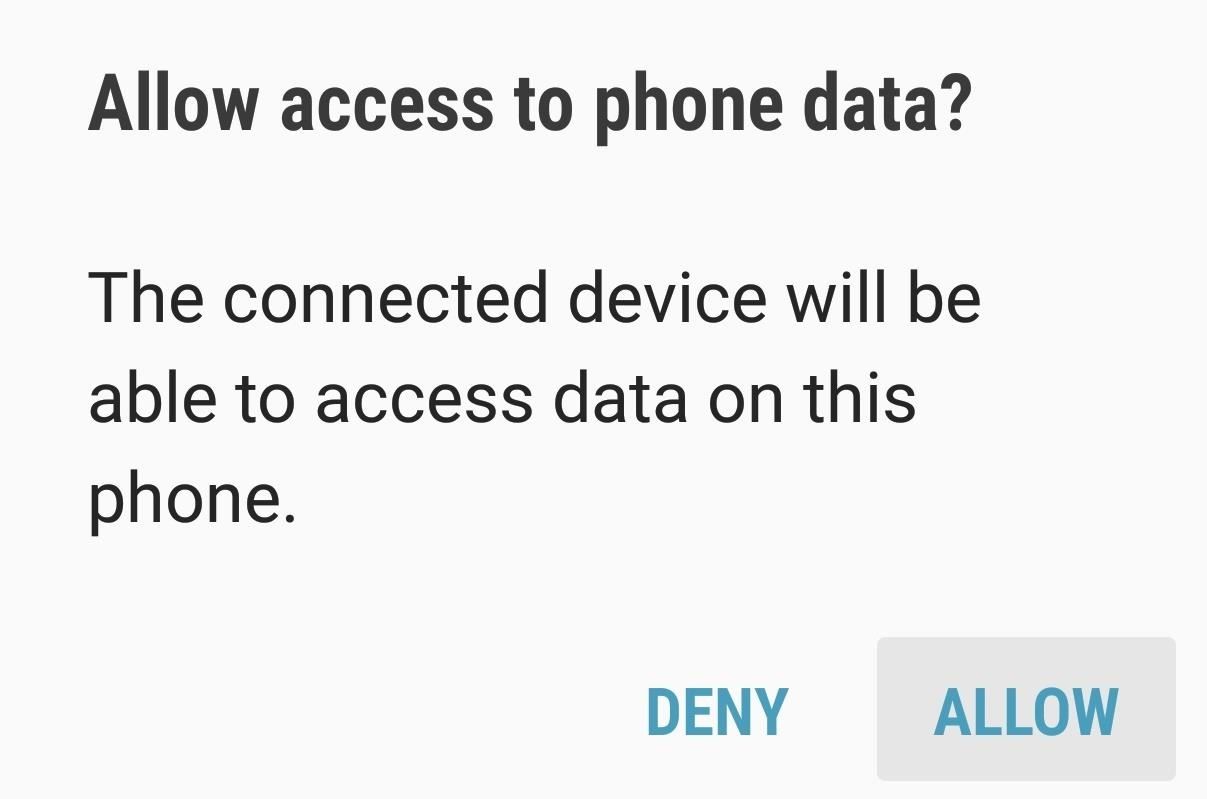
Step 1: Allow USB Computer ConnectionTo get started, connect your Galaxy S8 to your computer using a USB data cable. A "USB Computer Connection" notification will automatically appear once you plug in the phone, so tap "Allow" on the prompt to grant access.

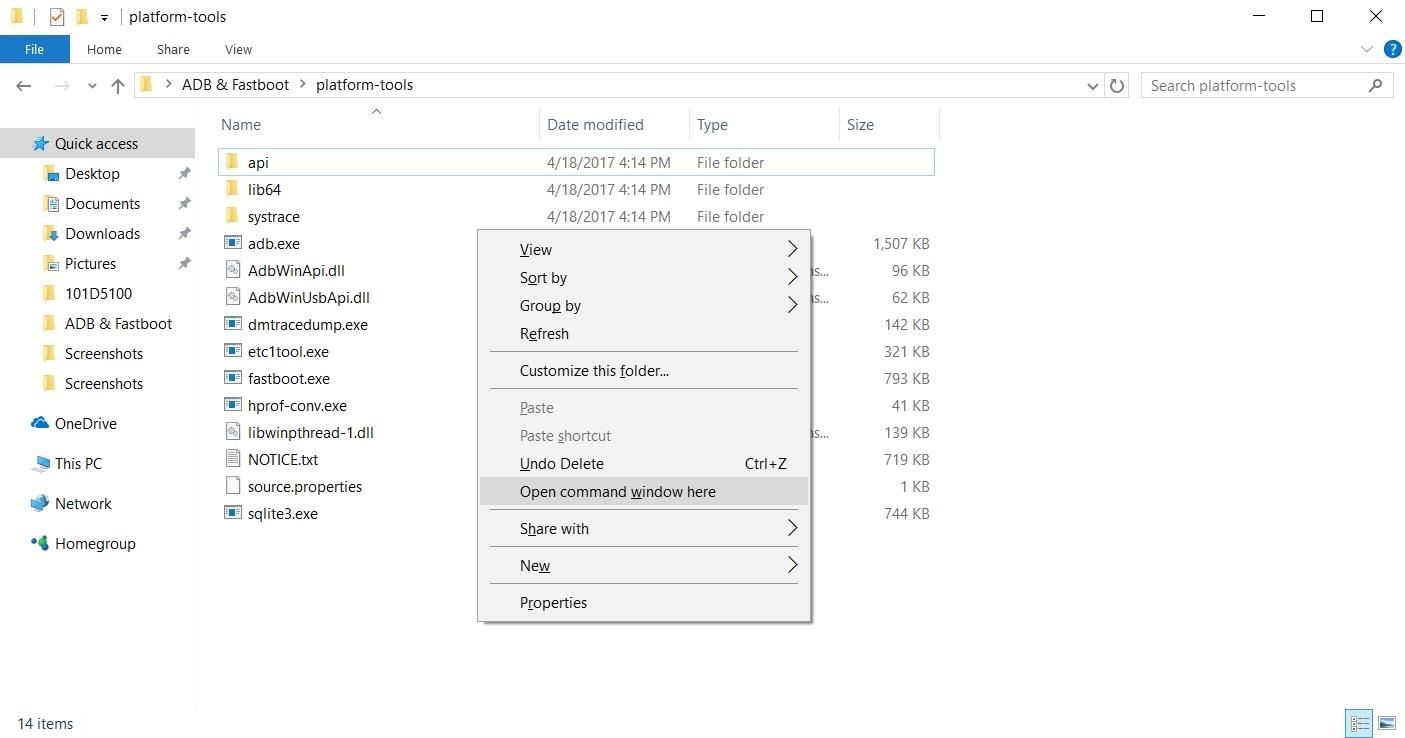
Step 2: Run ADBRunning an ADB command is necessary to modify the S8's display and keep it on Immersive Mode at all times. So next, you'll need to open a Command Prompt or Terminal window in the platform-tools folder inside of your ADB installation directory.If you downloaded the SDK Tools from Google and did a default installation, go to the C:\Program Files (x86)\Android\android-sdk folder. Otherwise, go to the folder where you installed ADB, then open the platform-tools folder located inside. From there, hold the shift button on your keyboard, then right-click within the window and choose "Open command window here."Don't Miss: Google Just Made It Easier to Flash Images & Sideload Updates on Your Android DeviceFor Mac and Linux, just open a Terminal window, and change directories to the platform-tools folder. Perform a search on your hard drive for "platform-tools" if you don't know where it is, as the folder's exact location can vary depending on where you extracted ADB and Fastboot when the utilities were installed. Opening an ADB command window on Windows. If you need a more thorough guide on the topic, head over to our full ADB and Fastboot guide to get to know this essential modding process a bit better.

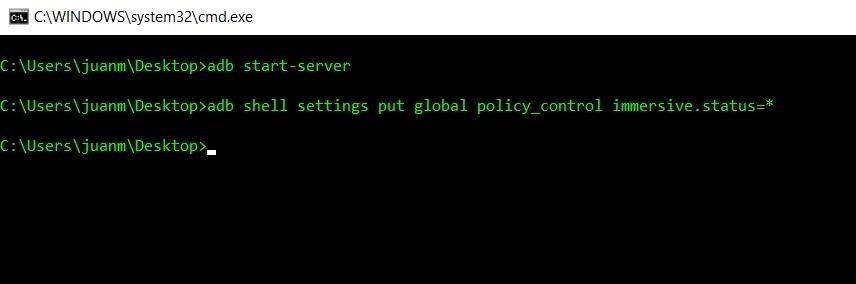
Step 3: Input CommandsWith the S8 connected and ADB up and running, you'll just need to type in a single command. However, there are three different commands that you can pick from, depending on if you want to hide the status bar, navigation bar, or both.To hide only the status bar at the top of your screen, enter this command:adb shell settings put global policy_control immersive.status=* If you'd just like to hide the navigation bar while leaving the status bar visible, enter this command:adb shell settings put global policy_control immersive.navigation=* Finally, if you'd like to hide both the status and navigation bars, use this command:adb shell settings put global policy_control immersive.full=*

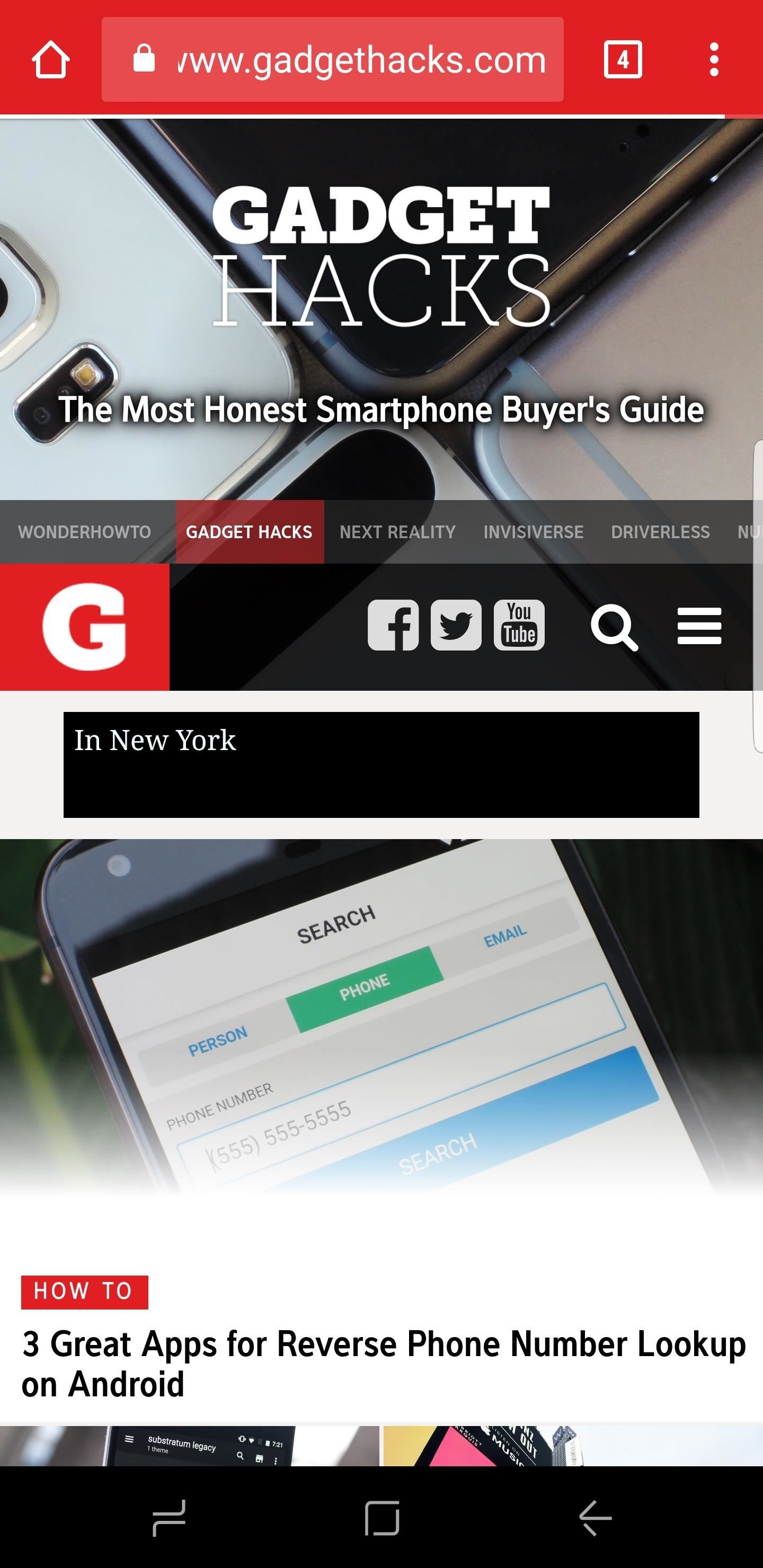
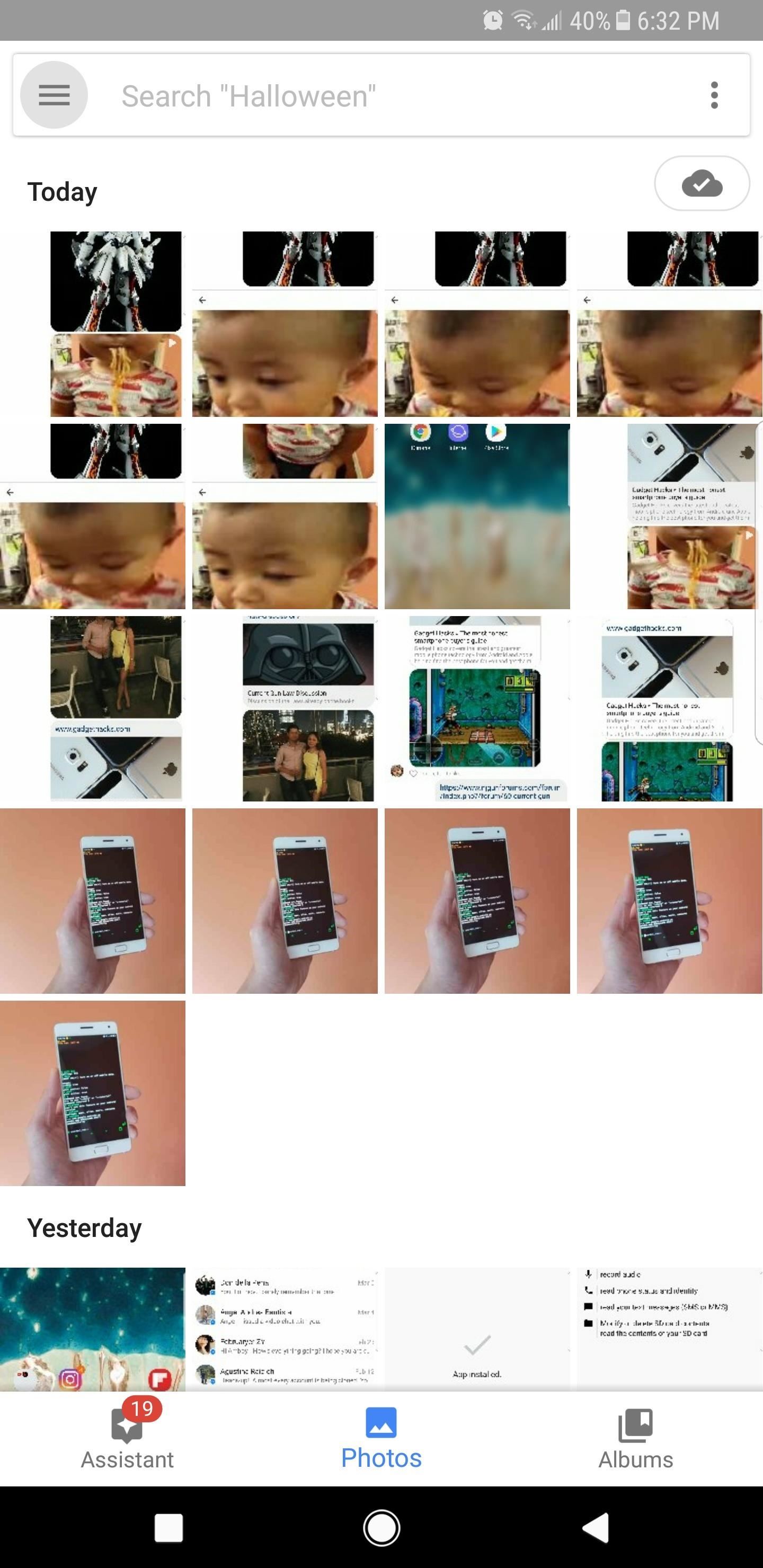
Step 4: Enjoy Full-Time Immersive ModeImmediately after sending one of the above commands, your status and/or navigation bars will disappear. At this point, it would be a good idea to restart your phone so that any apps that were previously open can redraw themselves to accommodate the extra screen real estate. (1) Status bar hidden. (2) Navigation bar hidden. (3) Both bars hidden. From now on, you'll still be able to access the navigation and status bars on your S8 by swiping in from either the top or bottom of the display, depending on which one you wish to access. The keyboard will still pop out as it normally does whenever you tap on a box that requires text input, and the home button's haptic feedback still remains active, but you'll need to reveal the navigation buttons to access Google Assistant.

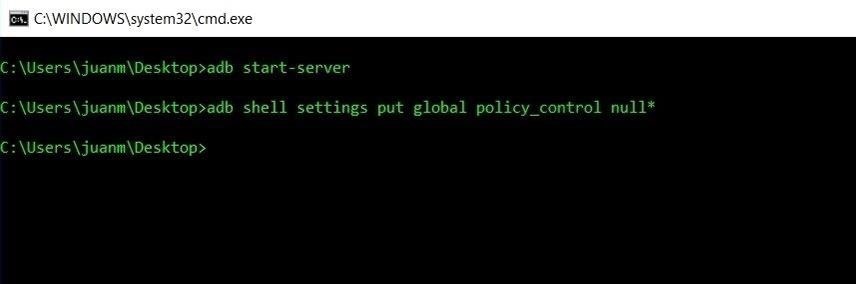
Reverting This ModFinally, if you ever want to bring your S8 back to its stock configuration and re-enable the status and navigation bars, simply type in the following command to bring the display back to its original settings:adb shell settings put global policy_control null* So how are you enjoying the extra bit of screen real estate you reclaimed by performing this mod? Let us know in the comment section below.Don't Miss: 5 Samsung Galaxy S8 Features You Need to Know AboutFollow Gadget Hacks on Facebook, Twitter, Google+, and YouTube Follow Android Hacks on Facebook, Twitter, and Pinterest Follow WonderHowTo on Facebook, Twitter, Pinterest, and Google+
Cover image and screenshots by Amboy Manalo/Gadget Hacks

Yahoo


To really customize your Samsung Galaxy S3, you'll need to be rooted, because most of the coolest mods and hacks require root access. If you haven't rooted yet, you're just barely touching the surface of what your GS3 can do for you.
How to Root Your Brand Spanking New Samsung Galaxy S4


Here are five of our favorite hidden features that we've discovered over the course of the last year, and why you might want to start using of them. 5 Hidden Windows 10 Features You Should
8 Cool Windows 10 Tricks and Hidden Features You Should Know 2017


NEW: Introducing AdaptiveZoom - an exclusive Action Launcher feature that zooms an adaptive icon to the center of the screen as the app loads! Note: AdaptiveZoom in beta, and requires adaptive icons (so you must be running either Oreo or AdaptivePack). NEW: 2018 Supporter badge is available!


The same report shows that if you sideload apps, you're almost seven times more likely to be infected than if you stick to Google Play as your app source. All of the data provided in the report is quite interesting, but there's a clear pattern among malware-infected users.
Google's Security Report Shows A Clear Pattern Among Malware


News: Create a Fire Mixtape with Your Friends Using Spotify's Group Playlists News: New Apple Music Update for Android Adds Support for Lyrics & More How To: Turn Pandora Likes into a Spotify Playlist Spotify 101: How to Use Voice Commands to Play Artists, Playlists & More on Your iPhone How To: Use Siri to Play Spotify Music & Start Playlists
How to Create Playlists on YouTube « Internet :: Gadget Hacks


Search query Search Twitter. Saved searches. Remove; In this conversation. Verified account Protected Tweets @ Suggested users
How to Bold, Italicize, & Underline Text in Gmail for Android


You can choose to erase individual messages, delete messages from a specific folder or erase all messages. If the LG enV message memory is full, the phone will stop receiving new messages. To prevent this from happening, it is important to delete text messages periodically, or turn on the auto-erase feature.


Everybody wants faster internet. If you've ever had to wait for Netflix to buffer while watching Stranger Things, you've probably also wondered how to up your internet speed so you can finally find out when Eleven and Mike will see each other again.
How to speed up your internet SPEED 10000x faster - Boost


This can suck hey. There are a few different types of PCB material. FR4 is the most common, this is very difficult to cut with a hacksaw. FR4 is made up of glass fibre matrix held together with an epoxy resin
Easiest way to cut PCB's? - diyAudio


News: Snapchat Lays Up Lens Studio Experience for Nike's Jordan Brand at NBA All-Star Weekend News: Try These 5 Hot New Snapchat Lenses — The Simpsons, Playable Flappy Bird & More Snapchat 101: How to Unlock Hidden Filters & Lenses News: 5 Secret Snapchat Lenses That Will Make Your Weekend — Infinity War, the Chainsmokers & More News: Try
Snapchat 101: How to Unlock Hidden Filters & Lenses


Talking about the next lineup of smartphones from the company in the Moto G series, it is certain that the successors to the Moto G5S smartphones will be named as the Moto G6 smartphones. As far as the Moto G6 series is concerned, the lineup will have smartphones like the Moto G6 Play, Moto G6, and the Moto G6 Plus.
Motorola's Moto G6, Moto G6 Play: Everything You Need to Know


Google released its "Android Security: 2016 Year in Review" report last month, and to no one's surprise, included its own flagship phones. However, one surprise on the list was the BlackBerry PRIV, which Google named one of the best Android devices for privacy.
Google Names BlackBerry PRIV an Android Security Leader in

News: A Return to Glory? HTC Releases the U12+ with 4 Cameras, Edge-to-Edge Display & Edge Sense 2

News: A Return to Glory? HTC Releases the U12+ with 4 Cameras, Edge-to-Edge Display & Edge Sense 2
2017 was a down year for HTC. First, the U11 and U Ultra were widely criticized. Later, Google purchased a large chunk of HTC's manufacturing division, leaving the Taiwanese company running with a skeleton crew after losing 2,000 key employees. But that's not stopping HTC — their flagship U12+ was just announced, and it's quite impressive.On the bright side, HTC received a massive influx of money from the Google deal — about $1.1 billion, to be precise. With this extra capital and the relative success of late 2017's U11+, the U12 Plus could start turning the tide for the once highly regarded smartphone company. The HTC U12+ is a competitive phone that gets many things right. While there is one glaring omission, it does check all boxes for a flagship device in 2018, and even brings a few new things to the table.Don't Miss: Why Google's HTC Purchase Is Nothing Like the Motorola Deal
SpecsOS Version: Android 8.0 Oreo Skin: HTC Sense Dimensions: 6.17" x 2.9" Thickness: 0.34" Weight: 6.63 oz CPU: Qualcomm Snapdragon 845 clocked at 2.8 GHz GPU: Adreno 630 RAM:6 GB Storage: 64 or 128 GB (expandable via microSD) Display: 6" Super LCD 6 Resolution: 2880 x 1440 (537 PPI) Rear Camera: 12 MP wide-angle camera and 16 MP telephoto Front Camera: 8 MP + 8 MP Battery: 3,500 mAh Water and Dust Resistance: IP68 Bluetooth: 5.0 Other: HTC Face Unlock, Edge Sense 2
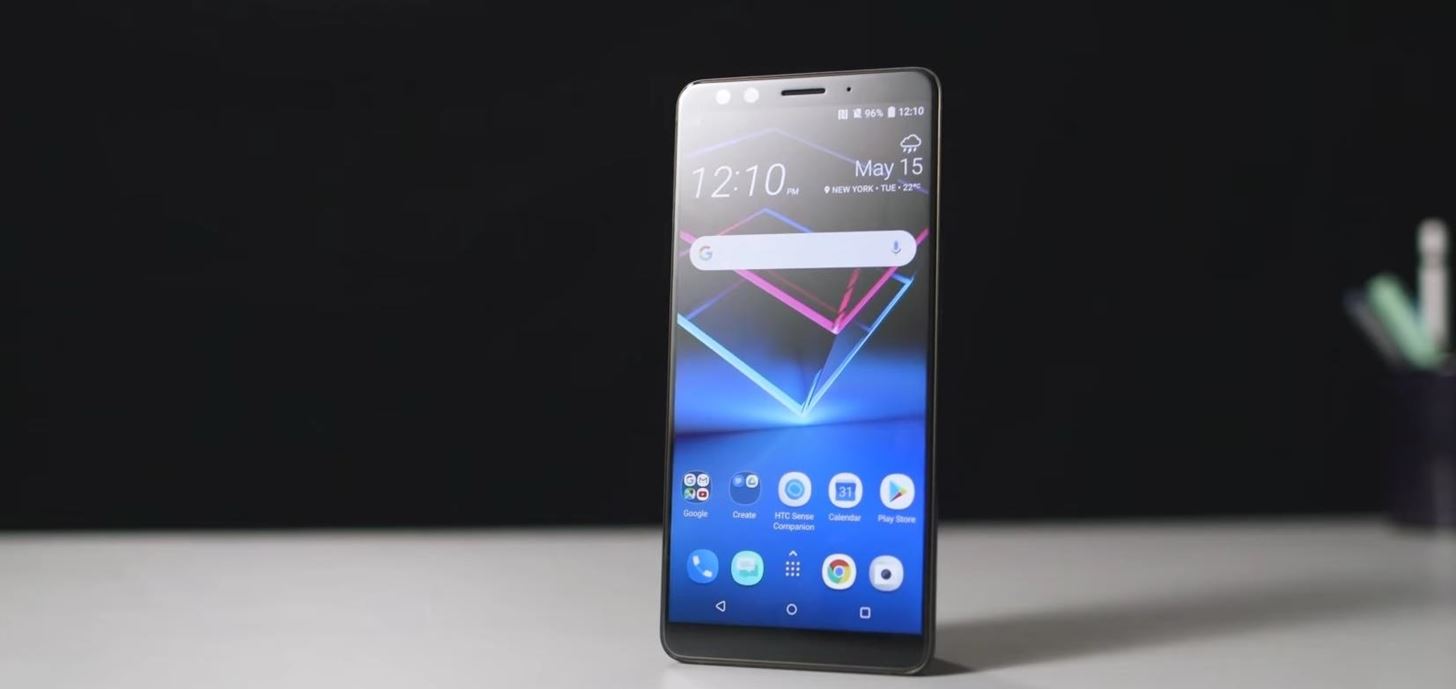
6" 2880 X 1440 18:9 Super LCD 6Like many of its predecessors, HTC will use Super LCD technology in the U12+ — specifically, it will borrow the same Super LCD 6 panel used in last year's HTC U11+.Super LCD panels, which are produced by S-LCD Corporation, differ from LCD by removing the air gap between the outer glass and the display element, which results in less glare. It also contributes to lower power consumption and improves outdoor visibility. HTC has been using the technology on their phones since the Nexus One, so its use was expected. Image by The Verge/YouTube The screen will be protected with Corning Gorilla Glass, although HTC didn't specify what version. Hopefully, after JerryRigEverything conducts his teardown of the device, we will learn this information. Our guess is it will use Gorilla Glass 5, as that is the most common version used by flagship phones in 2018. The display will support HDR 10 (but not the other HDR standard, Dolby Vision) with DCI-P3 and sRGB color spaces.
Qualcomm Snapdragon 845 SoC & 6 GB of RAMAs with every other non-Huawei Android device, at the heart of HTC U12+ is the latest and greatest from Qualcomm, the Snapdragon 845 with the Adreno 630. HTC will take full advantage of the octa-core chipset which can reach speeds up to 2.8 GHz.While the SoC comes as no surprise, the amount of RAM is a head-turner. The HTC U12+ will come with 6 GB on all SKUs. With this much RAM, it's on par with the Samsung Galaxy S9+ and OnePlus 6, two devices that are known to be great multitasking performers. Gaming performance should improve, as games are notorious for using quite a bit of RAM. However, for those of us who don't normally play games on our phones, the combination of the Snapdragon 845 and 6 GB should lead to a truly smooth experience across the board.

Edge Sense 2HTC will bring back an innovation they introduced last year with the HTC U11, Edge Sense. Updated for the new flagship, Edge Sense 2 will help separate itself from the competition with new tools unique to the device, which improve phone navigation. With Google adding Edge Sense 1.0 to the Pixel 2 lineup, we might be seeing the first new changes coming with the upcoming Pixel 3. Edge Sense 2 introduces a new way to interact with the pressure-sensitive sides. The gesture can be fully customized to your liking. You can double tap the sides to bring up apps and sensors. Just as you would perform the gesture on your display, by double tapping the side, you can activate one-handed mode. However, what makes this special is that the device knows which hand you are using and will adjust which side the one-handed mode switches to.Short squeezes and long squeezes are still present and remain as customizable as they were in Edge Sense 1. What will take some time to get used to is the new buttons which aren't really buttons. Similar to the iPhone 7 's 3D Touch home button, HTC has added the same pressure-sensitivity technology used in Edge Sense to replace all the buttons. Instead of depressing, you receive haptic feedback when you've applied enough pressure to activate the "button" functionality. It is different and could assist with operating your phone in the dark.
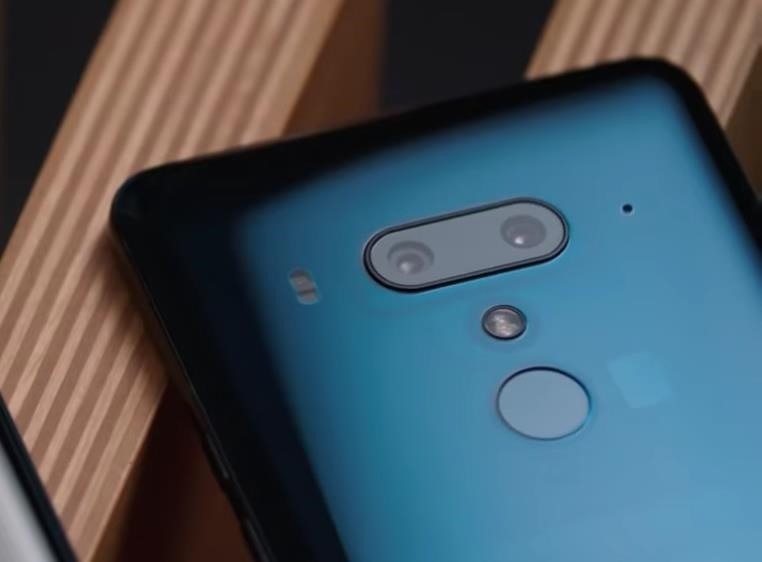
4 CamerasFor the rear cameras, there is a 12 MP main shooter and a 16 MP telephoto lens. The main shooter will be a wide-angle camera with HTC's UltraPixel 4 tech. UltraPixel sensors use enlarged pixels which capture over 300% more light than traditional pixels. The larger pixels improve low-light photography as more light is obtained, as well as improve overall picture quality by recording more information each time you take a photo. The main lens will have a f/1.75 aperture. The second lens provides 2x optical zoom, with digital zoom up to 10x. Its aperture is f/2.6.There is also UltraSpeed Autofocus 2, which uses phase detection and laser autofocus to get things in focus quickly. Portrait Mode is supported on the rear cameras as well. There is even AR sticker support for those looking to add a little flair to their photos. Pro mode with manual controls is also present with support for RAW format. Image by The Verge/YouTube As for the front cameras, the HTC U12+ will be in rare company as one of the few four-camera smartphones on the market. Dual 8 MP cameras are on board, each offering 84° field of view and f/2.0 aperture. With the dual lenses, Portrait Mode can easily be accomplished on the front cameras as well. AR stickers are supported on the front cameras as well, along with HDR Boost and live make-up. The screen will also act as a flash for a selfies in low lighting.Additionally, the front cameras will support Face Unlock. Face Unlock will be implemented similarly to the OnePlus 5, which relies on the selfie cameras to authenticate. While this isn't secure, it is fast and useful when you can't use your fingers to unlock your device (like when it is freezing outside and you have gloves on). Image by HTC/YouTube As for videos, up to 4k is supported at 60 fps. High-quality audio recording (24 KHz and 24 bit) is available, along with support for 360° 3D Audio (using the four microphones). Like many 2018 Android flagships, the U12+ will also support slow-motion video at 1080p at 240 fps. OIS is available for video recording. You can even take 8 MP photos while recording 4K video if you desire.
AudioOnce again, HTC has included its BoomSound technology in its flagship. Known as BoomSound Hi-Fi edition, HTC uses the bottom firing speaker and the ear speaker to provide high-quality audio that is better than stereo speakers firing from the bottom. Bass is handled by the bottom firing speaker while the ear speaker acts as a tweeter. Using this arrangement, HTC provides more full and rich sound.Like many OEMs, HTC has removed the headphone jack from their devices following the trend started by Apple's iPhone 7 and 7 Plus. The U12+ is no different and will not include the popular I/O port. However, thanks to Android 8.0 Oreo, Hi-Fi audio is possible via Bluetooth headphones, as the U12+ supports some Hi-Fi codecs such as aptX HD and LDAC.
Additional SpecsAs previously mentioned, the HTC U12+ will include a sizable 3,500 mAh battery. While not the largest capacity we have seen, this is definitely at the upper echelon of battery capacity, with many flagships opting for much less. Paired with this large capacity is Quick Charge 3.0, allowing for 50% charge in 35 minutes. It will also support Quick Charge 4.0 when paired with a compatible charger. As for wireless charging, HTC once again will forgo the technology despite its glass back.VoLTE and Wi-Fi calling are both supported. 802.11ac is supported, along with MU-MIMO for fast data connections when on a Wi-Fi network. You can use HTC Connect to wirelessly stream media from your phone to compatible external devices such as TVs, speakers, and audio systems. More popular standards are also supported such as Chromecast, DLNA, and Miracast. There is also support for DisplayPort over the USB Type-C port.Devices come in 64 GB or 128 GB storage variants, both of which support microSD expansion (up to 2 TB). Both options will include 6 GB of RAM.The Liquid Glass Surface design is also making a return. The design, introduced with the U Ultra, reflects light in a way that colors will change depending on the angle you view it from.
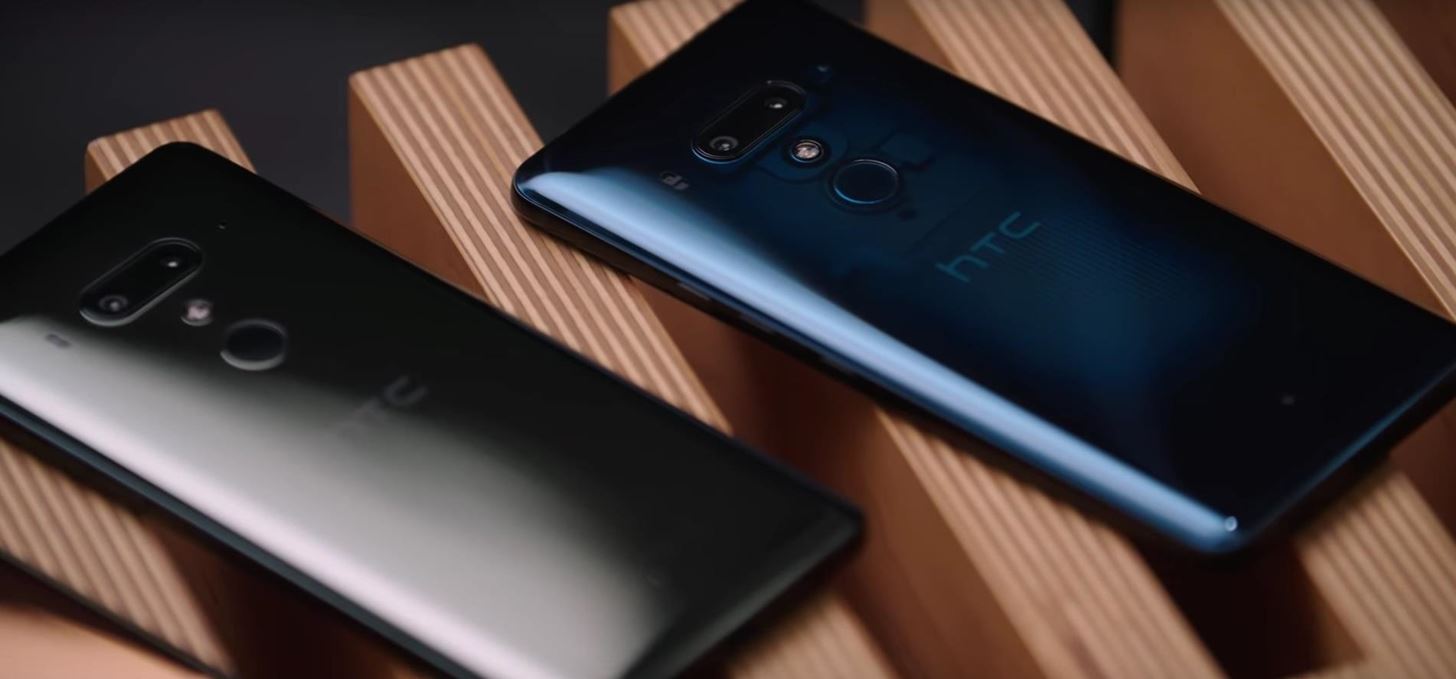
Price & AvailabilityThe U12+ is available right now from HTC's website. Use the link below to grab the 64 GB carrier variant (AT&T, T-Mobile, and Verizon) or the unlocked version, which comes with either 64 GB or 128 GB of storage. Only Sprint customers will not be able to use this device.Purchase the HTC U12+ from HTC Additionally, you can purchase the phone from Amazon. Apparently, this version will work on both GSM networks (AT&T and T-Mobile) and Verizon as well. This variant will not be sold through carriers.Purchase the HTC U12+ 64 GB from Amazon Purchase the HTC U12+ 128 GB from Amazon Pricing starts at $799 for the 64 GB version. For the 128 GB variant, the price increases to $849. For US customers, there will be two colors available — Translucent Blue and Ceramic Black. Translucent Blue is the most interesting out of the two as it is semi-transparent, revealing some of the internals of the device. There is also a red color, but it won't be available in the US. Image by HTC/YouTube With the HTC U12+, fans can be hopeful that HTC is on the rebound. How well it sells will largely depend on increasing customer awareness, but with the spec sheet this thing sports, we can be sure the phone will better compete against the likes of Samsung and LG. What do you think about the U12+? Will you give the once iconic brand another try? Let us know in the comments below.Don't Miss: LG G7 ThinQ Comes Packed with Notch, Super Bright Display, Impressive Sound & MoreFollow Gadget Hacks on Facebook, Twitter, YouTube, and Flipboard Follow WonderHowTo on Facebook, Twitter, Pinterest, and Flipboard
Cover image via HTC


The biggest change from Sense 4+ to the newest Sense 5 is Blinkfeed, a scrollable feed of news and social network updates. This is the first thing you see when you unlock the phone. While this is a uniquely personal new way to experience Android, you might still prefer the stock Android UI instead of bloated OEM skins.
Latest Phones — Page 2 of 3 « Gadget Hacks


News: A Return to Glory? HTC Releases the U12+ with 4 Cameras, Edge-to-Edge Display & Edge Sense 2 By Jon Knight; Smartphones; Latest Phones; 2017 was a down year for HTC. First, the U11 and U Ultra were widely criticized.
HTC One Specs « HTC One :: Gadget Hacks


Edge Sense 2. HTC will bring back an innovation they introduced last year with the HTC U11, Edge Sense. Updated for the new flagship, Edge Sense 2 will help separate itself from the competition with new tools unique to the device, which improve phone navigation.
Yahoo


News: Leaked Videos Show Off the HTC One M9 News: A Return to Glory? HTC Releases the U12+ with 4 Cameras, Edge-to-Edge Display & Edge Sense 2 News: Here's Your Official Look at the New HTC One M9 How To: Unlock the Adidas U11 team in FIFA World Cup 2010
How to Revert Back to a More Traditional Sense-Style Home


Android news, reviews, tips, and discussions about rooting, tutorials, and apps. HTC U11 Review:A Return to Glory Better cameras. The edge sense is nice but
G+ first thoughts and annoyances/likes. « Google+ Insider


PHONEDOG. PhoneDog Media is home to PhoneDog, Android & Me, TmoNews, and TodaysiPhone. The network receives 2.5 million unique visitors and 10 million pageviews each month, along with a combined


News: A Return to Glory? HTC Releases the U12+ with 4 Cameras, Edge-to-Edge Display & Edge Sense 2 News: Everything You Need to Know About the New Galaxy S9 & S9+ News: Pixel 2 May Resemble Samsung's S8 More Than the Original Pixel News: HTC U Spec Leak Shows Off Internals
HTC United States - htc.com


"Getting the HTC U11 life you're having it at an affordable price. The Usonic headphones are really, really great, so getting that in box is a bonus and is definitely a great value."
PhoneDog | The Leader in Mobile Phone News and Reviews


News: Leaked Videos Show Off the HTC One M9 News: Leaks Reveal a Bigger, More Powerful Version of the HTC One for September Release News: The New HTC One M8 Released Today—Here's Everything You Need to Know News: A Return to Glory? HTC Releases the U12+ with 4 Cameras, Edge-to-Edge Display & Edge Sense 2
HTC U11 Review:A Return to Glory : Android - reddit

A Return to Glory? HTC Releases the U12+ with 4 Cameras, Edge


News, email and search are just the beginning. Discover more every day. Find your yodel.
HTC U11 Officially Unveiled — Here's the Lowdown « Android
How To: Remove Pictures from the Main Feed in Google Photos Without Deleting Them

How To: Remove Pictures from the Main Feed in Google Photos Without Deleting Them
Google Photos just got a killer new feature that everyone should know about. Instead of one endless stream of every picture you've ever uploaded, there's now an "Archive" section where you can stash select shots.What this means is you can now remove pictures from your primary feed and put them in into a separate area for safe keeping. Then, when you're showing your main gallery to friends or family, these archived pics will be hidden away — though you'll still be able to view them whenever you want.It's a great way to deal with duplicate photos, private pics, or the type of shots that are worth keeping even if they aren't awesome enough to show off. And once you've used the new feature, your main photo feed will be a lot tidier. Best of all, it's available for both iOS and Android, so if you like what you're reading so far, we'll give you a quick tour of the new feature below.Don't Miss: Rooters Beware, Google Will Soon Start Locking You Out of Apps

Declutter Your Main Feed by Archiving PhotosTo get started, make sure you're running the latest version of the Google Photos app for Android or iOS. From there, head to the side navigation menu in Google Photos by tapping the three-line hamburger icon to the left of the search bar, then select "Archive" to tour the new section. Next, tap the icon in the upper-right corner of the screen. You can now choose which photos you want to hide from your main feed, so tap on the images to select them, then hit the "Done" button when you're finished. At this point, photos you selected will no longer appear in the main feed when you open the Google Photos app, but you can still find them later by heading to the Archive menu again. If your archived photos were previously part of an album, they will still remain in the album. On top of that, you can also find archived pictures through Google Photos' search feature. So for those who have pictures of the less innocent variety, archiving them won't keep them completely safe from prying eyes, but it'll at least remove unwanted items from your main Google Photos feed.Has this new feature brought some long overdue organization to your Google Photos feed? Feel free to comment below and share your opinions.Don't Miss: Google Lens Will Turn Your Phone's Camera into a Smart AI AssistantFollow Gadget Hacks on Facebook, Twitter, Google+, and YouTube Follow Android Hacks on Facebook, Twitter, and Pinterest Follow Apple Hacks on Facebook, Twitter, and Pinterest Follow WonderHowTo on Facebook, Twitter, Pinterest, and Google+
Cover image by Dallas Thomas/Gadget Hacks, screenshots by Amboy Manalo/Gadget Hacks


Don't Miss: 18 Tips for iOS 11's New Screenshot Tool on Your iPhone; So where does that leave us? There's one surefire way to secretly capture a picture or video snap from somebody without getting caught, and the majority of you will be able to utilize this method no problem.
How to Save Snapchat Pictures Without Notifying Others


After your live broadcast ends, you can now save Instagram Live videos. Press Save in the upper right corner. You'll only be able to save your video — not the comments, likes, number of
Instagram Live isn't Live Anymore -- You Can Now Save Your


Step by step complete tutorial on How To Unlock Bootloader, Install TWRP Custom Recovery, and Root Samsung Galaxy Tab S 8.4 LTE Get the complete tutorial on:
[HOWTO] Bootloader Unlock and Upgrade to Mar… | Verizon


Apr 04, 2013 · Even more important, a host of realities weighs against Facebook Home making a near-term impact on rivals such as Google or even Facebook's own users. Here's why: * A huge chunk of the smartphone
Qualcomm, Lenovo announce Project Limitless: the first 5G


The ultimate pixel editor tool Make beautiful pixel art, create game sprites, GIF animations and even draw online. Pixilart is a community of artists just like yourself with a passion for art and pixels!


Nov 07, 2013 · How to prepare your smartphone for a trip. Here are 10 tips that smartphone-wielding travelers should heed before hitting the road, from adding travel apps to guarding against exorbitant roaming
10 Ways to Prepare Your Cell Phone for a Trip | HuffPost Life


Prepare to waste your day — scratch that, month.Mario, Luigi and the whole gang just invaded your web browser. Full Screen Mario has updated Super Mario Bros. from your '80s Nintendo console to
Play Super Mario 64 in Your Browser - GameSpot


Best Android Games 2019. by John Corpuz May 6, 2019, Best Android Puzzle & Word Games Page 10: Best All 11 Mortal Kombat Games Ranked, Worst to Best. by Michael Andronico Apr 27, 2019,
Best Word Games for iPhone and iPad | iMore


Open Messages, tap , and enter a contact or tap an existing conversation. Tap . To search for a specific GIF, tap Find images, then enter a keyword, like birthday. Tap the GIF to add it to your message. Tap to send. GIFs from #images animate only in the Messages app on Apple devices.
How to send animated GIFs in the Messages app on iPhone


The simplest way to root the Droid 2/X is to use the Framaroot One-Click Root program. In order to use this program, you will need to set your phone to be able to install programs from sources other than the Play Store. Press the Menu button on your phone while on the Home Screen. Select Settings and then click the Applications button.
How to unlock a Verizon CDMA Motorola Droid X to use with

Use Google Drive files offline - Computer - Google Drive Help


Here's how to set text message notification settings on your Samsung Galaxy J3 V / J3 (2016). call *611 from your mobile
Messages Settings - Samsung Galaxy S7 edge User Guide
eguides.sprint.com/support/eguides/samsunggalaxys7edge/content/samsung_galaxy_s7_edge_ug/messages_settings.html
The messages settings menu lets you control options for your text and MMS messages including message limits, size settings, and notifications. Messages Settings - Samsung Galaxy S7 edge User Guide Getting Started


How To: Use Hashtags in Texts to Quickly Share Locations, Music, & Other Info on a Galaxy Note 2 or Other Android Phone
Using your Surface and your Android phone - support.microsoft.com


Buried inside the new Nook Touch's search bar is a hidden Web browser. It's far from fully baked, but hopefully it will be some day.
The Nook Touch has a Hidden Web Browser! (Video) | The eBook


How To: Build and use a handheld automated warspying device How To: Use different camera shutter speeds for great effects How To: Use camera angles for more than just a cool shot How To: Use a 16mm Bolex camera How To: Synchronize timecode for a multi-camera shoot How To: Use multiple camera angles when shooting a movie
How to Make magical handheld fireballs (that won't burn) with

How To: Change the live wallpaper background image on the Samsung Galaxy Tab

How To: Change the live wallpaper background image on the Samsung Galaxy Tab
Forget regular backgrounds. The new Samsung Galaxy Tab has live wallpapers, which are essentially backgrounds for your homescreen, but with a lively feel. It reacts to you. But if you want to change it, you can, and this is how you do on the Android OS. Press MENU < WALLPAPER < LIVE WALLPAPER and then browse and select the one you want. The click SET WALLPAPER to save it. Please enable JavaScript to watch this video.


I'm trying to create the icon for my iPhone app, but don't know how to get the exact radius that the iPhone's icons use. I've searched and searched for a tutorial or a template but can't find one. I'm sure that I'm just a moron, but how do you get the rounded corners exactly right with your icon from Illustrator or Photoshop? Edit:


Apple recently released their iOS 12.3 beta 3 to developers and now they have also released the software to their public beta testers. In order to try out the latest beta of iOS 12.3 you will
Apple Releases iOS 12.1.3 Beta 4 to Developers and Public Testers


How To: Theme the Android System UI on Your Nexus 5 How To: Add Smart Indicators for Battery Temp, Wi-Fi Speeds, & More to Your Galaxy S3's Status Bar How To: Apply a Custom Animation to Your OnePlus One's Notification Drawer How To: Theme the Navigation & Status Bars on Your Nexus 5
How to Set Custom Navigation Bar Icons in Android (No Root)


Back in 2009, largely due to the sheer number of users demanding it, Spotify added an amazing little feature — the ability to disable volume normalization. While the feature is nothing more than a toggle on the visual front, the audible difference is far superior and moons apart. According to
Disable loudness normalization - community.spotify.com


The first step is to find the menu. To find the Android Quick Settings menu, just drag your finger from the top of your screen downward. If your phone is unlocked, you'll see an abbreviated menu (the screen to the left) that you can either use as-is or drag down to see an expanded quick settings tray (the screen to the right) for more options.
Android Basics: How to Use the Share Menu - Gadget Hacks


It's easy to send animated GIFs from your iPhone using the Messages app, using the built-in app drawer added in iOS 11. In this tutorial we show how to make use of this feature, and amuse and
How to Search and Send GIFs with Messages in iOS - OS X Daily
osxdaily.com/2016/10/17/search-send-gifs-messages-ios/
The iOS Messages app for iPhone and iPad includes an animated GIF search feature which allows you to search for and send GIFs to any recipient, whether they have an iPhone with iMessage or not. Note that your iPhone or iPad must have a modern version of iOS to have the GIF search feature, iOS 10.0
How to Find & Send GIFs from the Message App on the iPhone


Developed upon Sony's own theme engine, Substratum allows you to theme any Android device running on Android 6.0 Marshmallow and above Android versions (Yes, Nougat is supported).
How to Theme Your Android Device Using Substratum | DroidViews


How To: Make a PVC Hand Pump to Move Water, Compress Air, & Create Vacuum How To: Vacuum your car How To: Remove a Dyson dc01 vacuum cleaner filter How To: Change a Dyson dc01 vacuum hose How To: Vacuum an in ground pool manually
How to Convert an Air Compressor Into a Vacuum Pump


This theme Sony reveal Xperia XZ2 Premium new screen 4K HDR Dual Camera appeared on Engadget. After the announcement of the phone is its flagship Sony Xperia XZ2 in late February, reveal Sony now phone most luxurious for those who prefer the features of the multiple which phone Sony Xperia XZ2 Premi
Sony unveils Xperia XZ Premium and Xperia XZs with 4K display


The Chromecast finally supports a feature users have been requesting for ages: customized wallpaper. Read on as we show you how to add custom wallpapers to your Chromecast's splash screen as well as turn on weather, news, satellite images, and more.
Set Chromecast Background Images as Your Android's Wallpaper


How To: Bring Back Confirmation Prompts When Uninstalling Apps in Windows 10 Forum Thread: How to Uninstall a Program or Virus from Windows 8 0 Replies 4 yrs ago How To: Uninstall a program in Windows 7 easily How To: Uninstall a program in Windows 7
[Tip] How to Restore Uninstall Confirmation Prompt Box in


Download Adblock Plus for Firefox. Blocks annoying video ads on YouTube, Facebook ads, banners and much more. Adblock Plus blocks all annoying ads, and supports websites by not blocking unobtrusive ads by default (configurable).
4 Simple Ways to Block Ads on YouTube - wikiHow


Check out our article on the best practices for managing your network firewall for an in-depth look at how you might want to configure your firewall rules. When you have completed setting up your firewall the way you want it, you should test your firewall to ensure that it is doing what you're expecting it to.
How to Track Firewall Activity with the Windows Firewall Log


Check out this How-to from Craftnerdy that shows you how to make an amazingly nerdy shower curtain in the likeness of Pac-Man. Get your nerd craft on! Pacman is Watching you Shower O.o.
How to Creative Pancake Art- Pac-Man Pancake « Dessert

News: Axon 7 Oreo Beta Now Open to US Users Here&#39;s How to Get It

News: Axon 7 Oreo Beta Now Open to US Users Here's How to Get It

In January, ZTE announced they would be conducting an Oreo beta program for Axon 7 users to test Android 8.0 before the masses. Since then, no additional information was released — until today, when ZTE finally opened up the Oreo beta to US customers.Using the link below, US Axon 7 owners can register for the beta program. If ZTE accepts your registration, you will receive the new Oreo build for Axon 7 as a regular OTA update, and all the subsequent beta updates would come the same way as they progress to the stable version (which is rumored to be released in April).Sign up for the ZTE Axon 7 Oreo beta program (US users only) Image by Marques Brownlee/YouTube ZTE will release the beta to a small group first, targeting individuals who can best assist them in the getting the update to a stable state as soon as possible. Specifically, they are looking for Axon 7 users who are on the B35 build. However, if you are not able to make the first round, ZTE has stated they will open registration up to more users as the beta becomes more stable.With the Oreo beta, Axon 7 owners will get their first glimpse at the new skin implemented by ZTE. Listening to the requests of their customers, ZTE ditch MiFavor UI for what is being referred to as Stock+. While little information is available, its names implies that the skin will be a move toward a more stock Android experience. Image by Marques Brownlee/YouTube In addition, the Android Oreo beta will provide Axon 7 customers a first glimpse of some the new features introduced with the Android 8.0 update Google pushed out last year. We have some extensive coverage highlighting these features which you can check out using the link below.Don't Miss: 27 Cool New Features & Changes in Android 8.0 OreoWhether merely convenient or by design, this news comes on the heels of some bad press for ZTE. After AT&T and Verizon were instructed by the US government to not sell Huawei's new flagship device, top officials elaborated on the reasons. The CIA, FBI, and NSA have come out suggesting American citizens shouldn't purchase smartphones created by Huawei and ZTE because of concerns over security. Particularly, these officials believe that both companies are influenced by foreign governments which could use the devices to threaten US interests.This isn't the first time ZTE has had a run-in with the US government. The company was hit last year with, at the time, the largest criminal fine in a case involving US sanctions, being forced to pay up to $1.2 billion. This was the result of the US learning that ZTE shipped products to Iran over the course of six years without proper licensing. It was only after this fine that ZTE was relieved of export restrictions between itself and the US. So while we don't wish to discourage you from joining the Oreo beta program, we do want to keep you informed.ZTE addressed the recommendation made by officials with the following statement:As a publicly traded company, we are committed to adhering to all applicable laws and regulations of the United States, work with carriers to pass strict testing protocols, and adhere to the highest business standards
— ZTE/XinhuaNetThe US government's recommendations aside, ZTE has done a great job with the Axon 7. The phone, which debuted back in 2016, is now one of only a handful of devices to get Android Oreo, and it's also one of the oldest. With the Axon 9 coming this year, ZTE fans need only to hold onto their devices for a few months before upgrading. Are you still using your Axon 7? Are you excited about Android Oreo? Let us know in the comments below.Don't Miss: Everything We Know About the ZTE Axon 9 So FarFollow Gadget Hacks on Facebook, Twitter, YouTube, and Flipboard Follow WonderHowTo on Facebook, Twitter, Pinterest, and Flipboard
Cover image via Marques Brownlee/YouTube


Apple Seeds Second Beta of iOS 11.1 to Developers and Public Beta Testers With New Emoji. Apple publishes software (like this beta) Following the release of iOS 12.3 on May 13, Apple has
New Unity Beta Brings with It Much Needed New Features


Apple just opened iOS up a little bit. It's now possible to sideload open-source apps — emulators, for example — onto an iPhone or iPad without paying $99 per year for a developer license. But the doors have just opened a crack. iOS still doesn't offer the full sideloading support Windows 10 and Android do without jailbreaking.
[Release] Sideloader Xcode Project - Sideload apps onto your


In this tutorial, I'll be showing you how to make the "Back" and "Recent Apps" buttons on your Nexus 6 switch places. You'll need a custom recovery and a Nexus 6 running Android 5.0.1, but that's
How to Swap the Back & Recents Keys on Your Samsung Galaxy S6


Step 4 Check if your contacts disappeared from iPhone are back. Part 2. How to Fix iPhone Contacts Disappeared with iTunes Backups. If you have backed up your iPhone before to iTunes, and missing contacts are included in the backup, restoring from iTunes would be the first option, and easiest way to get them back.
How to Fix Contacts Disappeared from iPhone 7/6s/6 after iOS


Photomath is the #1 app for math learning; it can read and solve problems ranging from arithmetic to calculus instantly by using the camera on your mobile device. With Photomath, learn how to approach math problems through animated steps and detailed instructions or check your homework for any printed or handwritten problem.
Genius app instantly solves math problems by using a phone's


How To: Use Hashtags in Texts to Quickly Share Locations, Music, & Other Info on a Galaxy Note 2 or Other Android Phone
Using your Surface and your Android phone - support.microsoft.com

Cinemark Movie Club Is a Great Subscription for Occasional


Apply a coating of flux to the stainless steel parts you are connecting. If you are soldering brass or copper parts to the stainless steel, tin them first by heating them and applying a thin coat of solder to the area that connects to the stainless steel.
soldering - How can I solder/braze thin stainless steel wire


Uploading either one is simple, but if you're new to Facebook or can't figure out why your profile photo looks odd, we've put together a simple guide on how to upload a Facebook profile


Homemade Night Vision - How to Make Night Vision Goggles There's a lot of fun to be had with night vision, both for kids and for the young at heart, and if you're primarily interested in these devices for their entertainment value, then you may want to find out how to make night vision goggles for yourself.
Make Your Own NIGHT VISION GOGGLES!: 5 Steps


And the two I want to focus on in this guide are Pinterest and Tumblr, which both offer a variety of unique job opportunities—you just have to know how to find them. Pinterest: Pin Your Way to Your Next Job. If your Pinterest feed is anything like mine, you're greeted with images of mouthwatering food every time you visit the homepage.
How to Use Pinterest for Business: 8 Strategies You Need to Know

How To: Put iPod Touch or iPhone into DFU mode

How To: Put iPod Touch or iPhone into DFU mode
If you are planning on jailbreaking your iPod or need an emergency restore, you will need to put your iPhone into DFU mode. DFU mode is only used in these dire circumstances, however, and can harm your device. If you need to use DFU mode for any reason, check out this tutorial first and make sure you have mastered the step by step. Please enable JavaScript to watch this video.


Ideally, the fan controller would even have a management for the sunshine inbuilt.Lutron Fan ControllerIf you're one who has a easy no-light fan and a gang field on the wall you're in the most effective case situation that's the best and most reasonably priced to do.
Use Fans with Air Conditioning to Boost the Cooling Effect


To set a ringtone for an Android contact, go to Contacts → Tap the contact you want to assign a specific ringtone to → Tap Edit → Tap Ringtone → Select a ringtone. Open the Phone app. It's on your phone's home screen, and has a phone icon.
How to set a custom ringtone on your Motorola Droid Turbo 2


News: Notch Types Out Pronunciation of 0x10c on Live-Stream: Calls it "Ten Screw" News: Zynga's PokerCon! News: Living in Emergency Stories of Doctors without Borders Camera Plus Pro: The iPhone Camera App That Does it All News: DIY Instant Indoor Skydiving News: wrap your brains around this one.
What is the point of indoor skydiving for fun? I know it is


From the Camera screen, tap on your Bitmoji and select gear icon on the next screen to go to Settings.; Here in Who Can… section, select See My Location.; Now, under Who Can See My Location tap on My Friends, Except… if you wish to hide your location from a few friends while select Only These Friends… in case of sharing location with only a few people.
"unable to connect to the device check the connection status


When Google finally gave us a dark theme for YouTube, it was a bit disappointing. They didn't use a pure black background, reducing some of the battery savings you'd get with an OLED panel. But with the help of another app, we can fix this, and not only get a real dark mode, but other colors as well
How to Get an Automatic Light & Dark Theme on Android


You can search for the app named hibernate in playstore. It comes in two different modes. One for the rooted user and other for the non rooted users. Grant the required permissions and then select the apps that you need to hibernate.
Get Sony Stamina (Power Saver) Mode on Any Rooted Android


Android apps check your system locale settings to determine which language they should display. For the most part, it's a seamless experience—except for those times when an app has not been translated into your language of choice, in which case the app will usually default to English.
Switch Between Multiple Languages On Android With Quick Locale


A proxy server sits between your computer and the Internet. They're often used to filter out unwanted sites and they can help boost connections in certain circumstances. You can bypass the server
How to Bypass an Internet Filter With Tor: 7 Steps (with


Then next thing I knew there was a new user added to my laptop and apps kept re-apearing like Group Share, Or apps that mirror what im doing on my phone or laptop and things weren't running right. That laptop had nothing saved on it other than 2 photo sessions with clients but yet the memory was full. Same thing goes for my Samsung Galaxy S 5


The Nexus Player is one of the most robust set-top streaming devices on the market. This is mainly due to the fact that the base software it runs is a direct fork of Android, which is a very powerful operating system itself.
Automate the Screensaver on Your Nexus Player [How-To]


AT&T, Verizon and T-Mobile are offering help to those affected by the tornadoes that tore across Ohio Monday.AT&T is offering network equipment, relief supplies and mobile charging stations for
How to stop Verizon from selling your information to marketers


Hi new member here. Few questions. Hot air vs Tweezers - Page 1 Few questions. Hot air vs Tweezers Don't promise a customer you can fix a problem rather fix
Tech Tips - Snaglr.com


Tip #4: When wiring LED light bar relays or switches, fuse all positive side wires such as from the positive battery terminal to the light bar switch. The fuse rating should not correspond to the wire size but instead to the maximum current expected on that wire.
How to Wire an LED Light Bar Properly (Project Night Light

How To: Write on someone&#39;s wall from your Facebook fan page

How To: Write on someone's wall from your Facebook fan page
In this tutorial, learn how to use your Facebook Fan Page to comment and write on other people's walls like you would a personal account. Your fan page is linked to your personal page, and sometimes you don't want to use your real identity to write messages. Check out this clip and get the hang of a FB glitch that will allow you to "tag" your friends so you can write on their walls. Please enable JavaScript to watch this video.


How to Build a Space Communication System Out of Lasers. Engineers are outfitting observatories like these with laser communication capabilities. How to Build a Space Communication System Out
Laser Communication Sold Direct on eBay | Fantastic Prices on Laser Communication
AD


So, You Need To Manually Change It. Gmail App Also Has Swipe Action Feature. When You Swipe To An Email Message, It Will Be Archive. But Archive Does Not Let Your Message Delete. By Default Swipe Action Set To Archive. Most Users Want To Change This Swipe Action From Archive To Delete.
How to Customize What Gmail's Swipe Gestures Do


You can now just order an SD card from N2ACards.com and they will ship you an SD Card that you can just pop into your Nook Color and boot right into Android. Just like the instructions above, you can simply power down the Nook Color, remove the SD Card, and power the Nook Color back up and you're right back into the Nook flavor of the OS. Cool!
Turn your Nook Color or Nook Tablet into an Android 4.1


Google Play offers a free MP3 download of Linkin Park's Hybrid Theory album. This album typically goes for $11+ as a digital download or $7.. Jan 23, 2018 - 53 min - Uploaded by MiR0*I do not own
Linkin Park's "Hybrid Theory" - FREE on Google Play - Warner


Account Number. Last 4 digits of your SSN. For commercial accounts, the last 4 digits of your Tax ID. Please notate your username is ""
Recover Username - MyAccount


Use an HDMI cable to connect your TV to the adapter and then plug the adapter into your iOS device. Switch the input on your TV to whatever HDMI port the cable is plugged into and you'll be seeing your iPad or iPhone on the TV right away. Whatever photos, videos, or other content you see on your device will show up on your TV, too.
Play Your Music Wirelessly On ANY Home Stereo - YouTube


Choose whether you want to delete only certain parts of your Google history. This is preferable if you use Google Now, because your cards are based on your Google history. Deleting the finance, shopping or other sections may remove the efficacy of those cards and your voice search.
How to Delete Google Search History, Accounts & Data (Guide)


Yup, you read that right. As of now, you can actually play the first level of one of the most popular video games of all time—Super Mario 64—directly in your web browser. Developer Erik Roystan Ross redesigned the first level of Super Mario 64, originally called Bob-Omb Battlefield, in order to test out one of his other projects.
Super Mario Bros in HTML5

Best Devices To Test For Your Android App - afourtech.com


How to use Gmail's 'Multiple Inboxes' for extra Gmail accounts Go back into the settings menu of your primary Gmail account and open the Multiple Inboxes menu. In each of the panes simply type
How To: Get Organized with Multiple Inboxes in Gmail | Techerator

Can't Upload Photos to Facebook in iOS 6? Here's How You Stop


xda-developers Samsung Galaxy Note 3 Galaxy Note 3 Themes and Apps [Guide-Lollipop]Clock center status bar. by thanhfhuongf XDA Developers was founded by developers, for developers. It is now a valuable resource for people who want to make the most of their mobile devices, from customizing the look and feel to adding new functionality.
How to Customize the Status Bar on Android (Without Rooting)


If you've ever prematurely dismissed all of your push notifications before you got a chance to read each one, you know how annoying it can be to dig through all of your apps to try and find the one with the missed notification. Android does have a built-in notification history you can check out, but
How to Add Quick Settings Toggles to the Notification Tray on


Credits go to Make Magazine for the idea Laser communication is generally used to transmit data wirelessly through a laser beam. This demonstration is a more simple visual understanding of how
Make a Simple Laser Communicator - Metacafe